

Manage Suspicious Email Using Mimecast
Mimecast Email Security provides a suite of detection and prevention tools that enable automated blocking of malicious email, and a way to manage spam. It provides a function that holds spam until the recipient chooses to release, permit, or block the message from being delivered to their inbox.
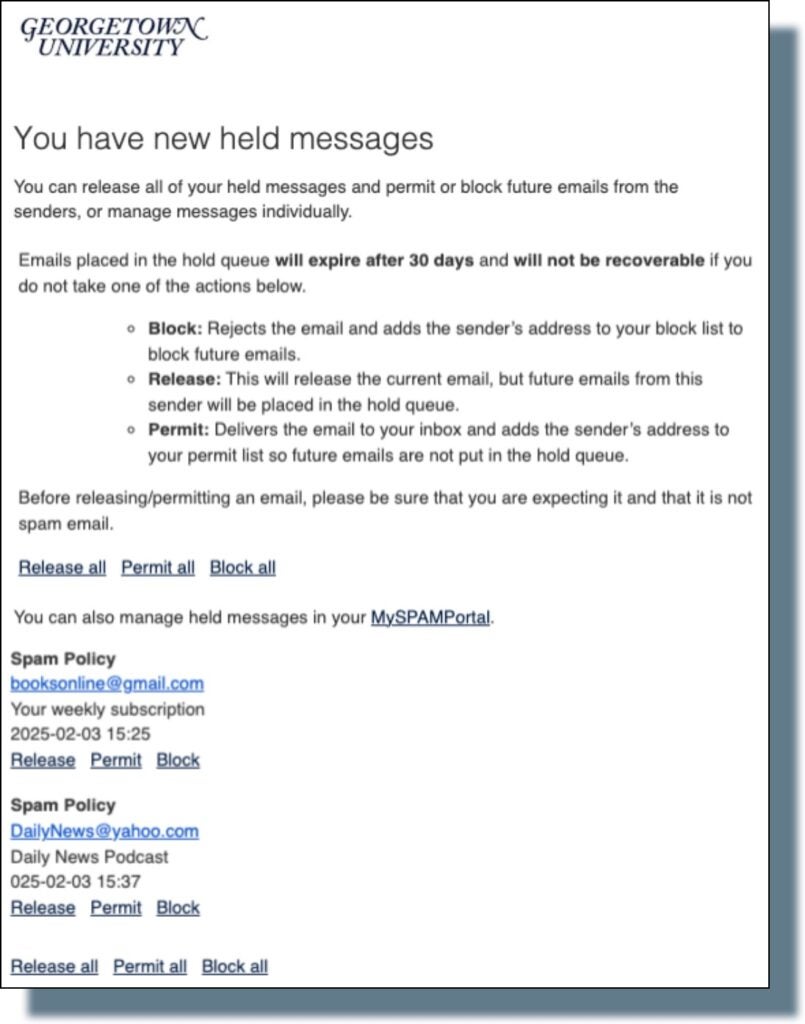
Twice a day, you’ll receive an email from no-reply@georgetown.edu letting you know of any held spam messages you’ve received and you can choose to take action.
Managing Emails Identified as Spam
In every digest notification, you can take the following actions for each of the emails listed:
- Release/Release All – Delivers this email or all messages, but future messages from this sender may still be blocked.
- Permit/Permit All – Allows this email or all future messages from this trusted sender to be delivered.
- Block/Block All – Blocks this email or all future messages from this sender.
*Please note that these messages will expire and be unrecoverable after 30 days.
Manage Emails in MySPAM Portal
You can also manage held emails by logging in to the held email location (i.e., the MySPAMPortal) using your NetID@georgetown.edu email address and NetID password, and selecting the portal location.
Frequently Asked Questions (FAQs)
- How do I manage messages in my Mimecast Portal?
- Why do I receive a SAML error (in Chrome) when I try to login to Mimecast?
- Why are some legitimate emails being blocked?
- How long is a message held?
- What will happen to my GU Mail (Gmail) spam folder?
- Has Mimecast been successful?
- Why do I keep having to permit the same company or domain repeatedly?
- How do I manually block an email address or domain?
- If I made a mistake and selected the wrong domain, can I unblock it?
- What are these “held messages” I keep getting?
- Why am I getting multiple digests in my main georgetown.edu account?
- How do I see all the filters I applied?
- How will this impact my email?
- Are my emails being read by a GU Email Administrator to determine whether they have suspicious content?
- Why does my digest notification only show the sender’s email address and not any content?
- What if I don’t take action on my digest emails within the 30 calendar days?
- If an item is permitted/released, will it be allowed next time?
- Can I check to see if I inadvertently blocked a business email?
- I don’t like the mail filter – it blocks too many messages I need!
- If I ignore a held message indefinitely, will it eventually regard it as outright spam?
- I have a message that is clearly spam that made it to my inbox. How did that happen?
- How do I filter digests to prevent them from being sent to my inbox?
- I received a Suspected Malware Notification advising my email may contain suspected malware.