

Canvas Outage Update
Posted in UIS News & Announcements
Access Restored and Security Guidance
May 8th 2026 @ 12:15pm ET
Dear Members of the Georgetown Community,
Instructure, the vendor providing our Canvas learning management system, has announced that Canvas is once again available for use. After reviewing potential ongoing cybersecurity risks, Georgetown University is restoring access to Canvas.
What You Need to Know Before Logging In
While the Canvas platform is back online, we are operating in a state of enhanced vigilance. We ask all faculty and students to follow these safety protocols:
- Audit Your Course Links: If you are a faculty member, please do a quick review of your course “Announcements” or “Modules.” If you see any unfamiliar links or messages that were posted between May 3 and May 7, do not click them. Delete them and contact UIS at help@georgetown.edu
- Be Wary of “Urgent” Requests: The group responsible for this breach may attempt to send highly convincing phishing emails. Continue to be alert to unsolicited emails or messages appearing to come from Canvas, particularly any requesting login credentials or personal information. Report anything suspicious to help@georgetown.edu
- File Safety: While there is no direct evidence at this time of malware being injected into existing files, we recommend that users not download and open unexpected attachments that appeared during the outage period.
Academic Support and Flexibility
We understand the timing of this disruption is particularly challenging as many students and faculty are navigating exams and the end of the semester.
- Direct Outreach: We understand that both students and faculty may feel uneasy about the reliability of Canvas links and file attachments. To help reduce anxiety and prevent any risk of missing or inaccessible work, we encourage academic leaders and faculty to reach out to their students to resend their work via email, as opposed to through Canvas. To maintain alignment with our security protocols, ensure that any attachments are sent from students’ Georgetown email addresses. This added step provides an extra layer of protection for our systems while giving students and faculty confidence that assignments have been securely received and are readily accessible. Faculty can also find more information regarding ways to get in touch with students, outside of the Canvas system, on this site.
- Flexibility: Recognizing the Canvas outage placed unexpected pressure on students, we ask academic leaders and faculty to offer flexibility with deadlines for anyone who could not submit assignments or access needed course materials while the system was down. Faculty will receive additional information shortly about grading deadlines and policies.
Continued Monitoring
UIS will continue to coordinate with Instructure and monitor the situation and our Canvas environment. If you have any ongoing technical or cybersecurity concerns, please contact help@georgetown.edu.
We recognize the impact this has had, especially as you navigate the end of the semester, and for many of you, are looking ahead to commencement. Community members can visit Every Hoya Cares to connect with resources to support their mental and emotional well-being. We ask for patience as we continue to navigate this evolving situation together.
We will continue to update the University Information Services website with any additional updates and information.
Sincerely,
Doug Little
Chief Information Officer
Annamarie Bianco
Associate Vice President and University Registrar
Cornelia Gustafson
Assistant Dean and Registrar, Georgetown Law
Nicole M. Houle, EdD
Associate Dean for Enrollment (Registrar) and Financial Aid, Georgetown University School of Medicine
Canvas Update
May 7th 2026 @ 10:00pm ET
Canvas remains offline and inaccessible. Georgetown will revaluate the system and provide an update on the operating status on Friday, May 8 before noon.
Message to the University Community
May 7th 2026 @ 6:00pm ET
Dear Members of the Georgetown University Community,
We are writing to inform you that Instructure, the vendor providing our Canvas learning management system, has experienced a third-party security breach. This vendor-based incident is impacting educational institutions globally.
In light of this security breach, Canvas is currently not available to the Georgetown community. For community members’ safety and security, the login button has been removed from our Canvas site. Please do not attempt to log into Canvas until an all-clear HOYAlert is sent.
We ask that faculty be flexible where possible with final exam, project and paper deadlines. Students, please email your instructor directly if you have time-sensitive questions.
Continue to be alert to unsolicited emails or messages appearing to come from Canvas, particularly any requesting login credentials or personal information. Report anything suspicious to help@georgetown.edu.
We recognize that this is distressing, especially as this is occurring while many students and faculty are navigating exams and the end of the semester. Community members can visit Every Hoya Cares to connect with resources to support their mental and emotional well-being.
We will provide further updates as more actionable information becomes available to us from Instructure on the University Information Services website.
Sincerely,
Doug Little, Chief Information Officer
Norman J. Beauchamp Jr., Executive Vice President for Health Sciences
Soyica Diggs Colbert, Interim Provost
Joshua C. Teitelbaum, Interim Dean and Executive Vice President, Law Center
Instructions for Faculty Members on How to Communicate with Students
Log in to gufaculty360.georgetown.edu
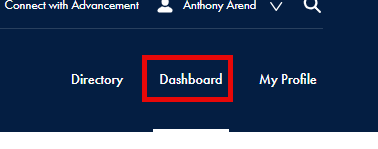
Click “Dashboard” in the upper right hand corner:
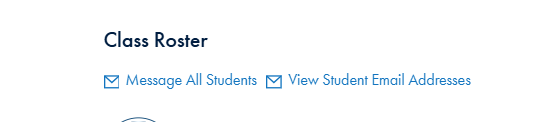
Scroll to the “Class Roster” section (after Advisees):
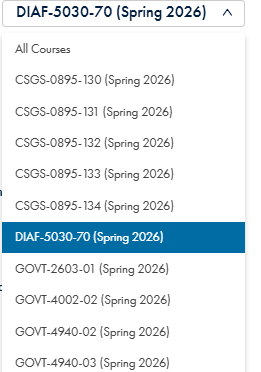
Use the drop down on the right to select a specific course:
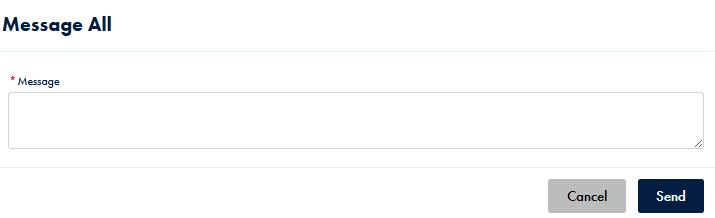
“Message All Students” will email directly from this page to whichever students are shown after selecting a course.
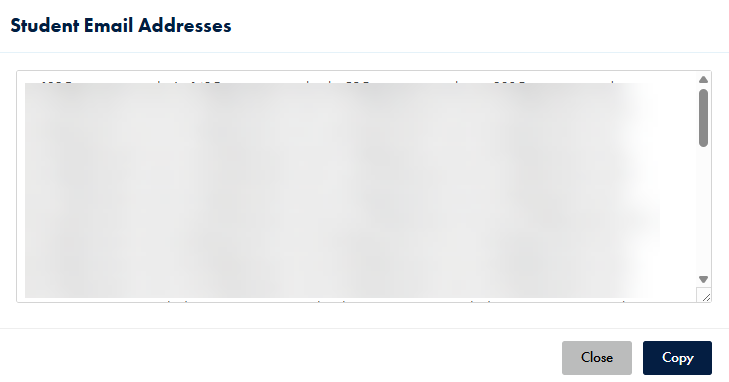
“View Student Email Addresses” will show the email addresses for students in the selected course that you can then copy and paste into GMail to compose and send from there.
UIS Update
May 7th 2026 @ 5:30pm ET
Canvas is currently experiencing a global outage impacting Georgetown’s Canvas system. Please do not log in to Canvas or attempt to reset your password at this time.
UIS will continue to provide updates here.