

Verify an Email From UIS
Subject: Amazon Web Services Outage

Amazon Web Services is currently experiencing service outages impacting the performance of GU systems including but not limited to Banner, Canvas, GOCard, and Marketing Cloud. As a result you may notice issues such as slow responses when using these systems. UIS is monitoring the AWS outage and will post any updates in this space.
For more information or to report problems, please contact help@georgetown.edu.
10/20/25
Subject: Action Needed: Windows 10 Support Ending on October 14. Need to Update Your GU Device
Greetings,
We are reaching out to remind you that support for Windows 10 is ending on Oct 14, 2025 and will be considered a security vulnerability. Our records show that your device is still running Windows 10 and MAY NOT be capable of being updated.
Please attempt to upgrade your device using the instructions for upgrading to Windows 11 here.
For devices that cannot be upgraded:
- If the device is no longer used or is no longer in service, please make arrangements to retire the device by contacting your Account Manager.
- If the device is still in use and is a user’s primary device, please make arrangements to purchase a new device if eligible. You can contact your Account Manager for information on computer purchasing.
You can also reach out to help@georgetown.edu if you have any questions or concerns.
Sincerely,
University Information Services
help@georgetown.edu
202.687.4949
10/2/2025
Subject: New Email Security Filter Launching June 2
Dear Members of the Georgetown University Community,
In order to further enhance protection against phishing, fraudulent, and malicious content, starting Monday, June 2, the university’s Cybersecurity Office (UISO) will deploy a new service providing additional email security. An added benefit to this additional protection is that you will be able to manage and reduce unwanted emails, like spam and junk.
As part of this change, you will receive a digest email titled, “You have new held spam messages,” listing the emails that have been identified as spam in your Georgetown mailbox.
You will receive this notification twice a day, at 10 a.m. EST and 3 a.m. EST listing spam emails that have been identified since the previous digest. If you have no new spam emails, you will not receive this notification.
In every digest notification, you can take the following actions for each of the emails listed:
- Release/Release All
This will release the current email, but future emails from this sender will be placed in the hold queue. - Permit/Permit All
Delivers the email to your inbox and adds the sender’s address to your permit list so future emails are not put in the hold queue. - Block/Block All
Rejects the email and adds the sender’s address to your block list to block future emails.
*Please note that these messages will expire and be unrecoverable after days.
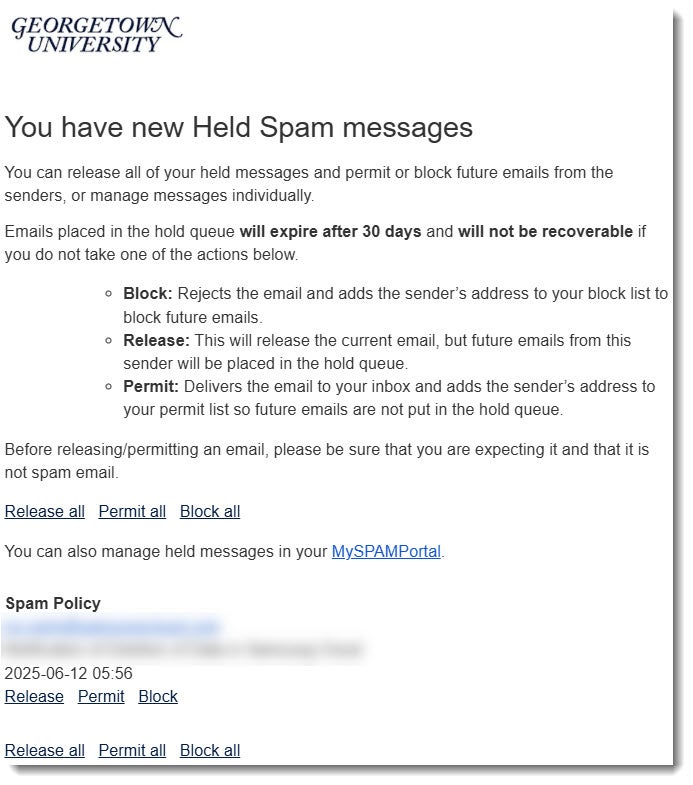
You can also manage held emails by logging in to the held email location (i.e., the MySPAMPortal) using your NetID@georgetown.edu email address and NetID password.
Thank you for your participation in this effort to enhance cybersecurity at Georgetown. For more information, please read the FAQ on the UIS website.
Sincerely,
University Information Services
5/27/2025
Subject: You have new held messages
6/12/2025
Subject: Update on Recent Emails From Georgetown University That Were Not Delivered to You
Dear _____,
We are reaching out to inform you that we recently identified a technical error that resulted in your address being inadvertently excluded from messages sent via the University’s broadcast email system.
The issue has now been resolved, and we apologize for this error.
If you were expecting a communication, or are aware that you missed one recently, you can view the websites below.
Particularly, we want to draw your attention to these two messages: Who We Are and What We Stand For and Share Your Feedback on Georgetown’s Presidential Search.
University Messages to the Community
Office of the President Messages
Office of the Provost Messages
Active Construction Projects page
Sincerely,
Broadcast Email Services Team
University Information Services (UIS)
2/26/25
Subject: ‘Follow up – Action Required: Less Secure Email Access Ending March 14, 2025’
Dear _____,
We are following up on the email you received last Friday, subject “Action Required: Less Secure Email Access Ending March 14, 2025,” to clarify a few questions.
This action applies to you because you use an application that accesses your Georgetown account with only a username and password (not the NetID login and NetID password method that prompts for Duo). While we cannot determine which application you are using the less secure authentication method for, the following applications may need to be addressed.
- Outlook 2016 or earlier
- Outlook for Mac 16.10 and earlier
- Thunderbird 77 or earlier
- The Apple mail app on iOS 8.3 or MacOS 10.13 and earlier
- Other legacy email clients
This applies to your account: _______ .
Starting on March 14, 2025, only applications that support this secure access method can access Georgetown Google Workspace accounts. This date is not flexible because Google is enacting this change. Web access to your email is not affected.
If you would like to review previous communications on this topic, please visit the UIS Verified Email Site.
Instructions
The easiest way to reconfigure your Georgetown Gmail account for your application is to remove and re-add it. When you re-add your account, the login process will prompt for Duo and ensure that you have correctly set up your application.
For information on how to remove and re-add your Georgetown Gmail account to your application, please find the full instructions here: Less Secure Apps Instructions.
If you have any questions or need support making this change, please contact the UIS Service Center at help@georgetown.edu.
Regards,
University Information Services
help@georgetown.edu
help.georgetown.edu
202.687.4949
2/25/25
Subject—‘Action Required: Less Secure Email Access Ending March 14, 2025‘
You are receiving this email because you are checking your email using a Password-based authentication service that will be terminated on March 14, 2025. You must convert to a supported method to continue accessing your email after that date.
The email account you need to update is ___@georgetown.edu.
Access through basic authentication makes accounts more vulnerable to hijacking attempts. Starting on March 14, 2025, only apps that support a more modern and secure access method called OAuth can access Google Workspace accounts.
To reconfigure your email authentication method, please see the instructions here: Less Secure Apps Instructions
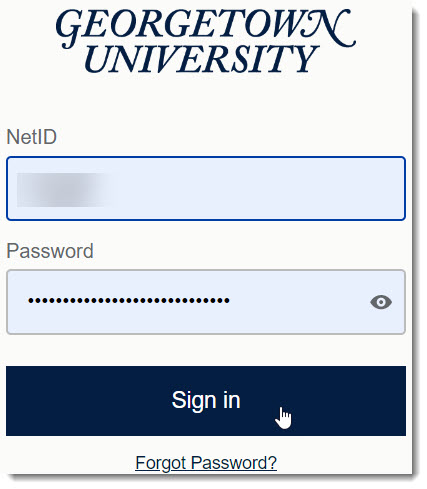
If unsure, disconnect your email account from your application and sign in again. If you don’t see the Georgetown University OAuth login screen below and get prompted for DUO, you use Password-based Access and must switch to continue using the application. Most updated email clients support OAuth.
If you have any questions, please contact the UIS Service Center.
Regards,
University Information Services
help@georgetown.edu
help.georgetown.edu
202.687.4949
2/21/25