

How do I filter digests to prevent them from going into my inbox?
How to create Gmail rules for existing emails
In addition to creating Gmail rules from scratch, you can create Gmail rules directly from the emails already in your inbox.
- Open Gmail in your web browser. Check the boxes next to all emails that apply to the criteria for the rule you wanted to create.
- Click on “More”, the button with the three vertical dots under the search bar.
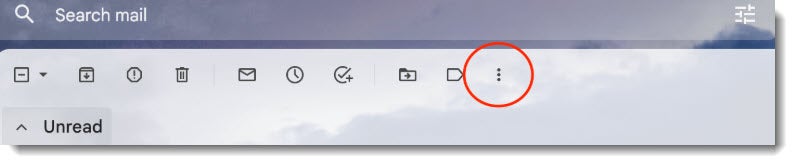
- Click “Filter messages like these.”
- Make sure to double-check the criteria you want to use for the filter.
- Click “Create filter.”
- Again, choose the behavior that you want to apply to the rule (Mark as read, Delete, Archive, etc.)
- Click “Create filter.”